
Try Elena AI Gardening Assistant and Our AI Garden Border Designer – Explore Your Garden’s Potential
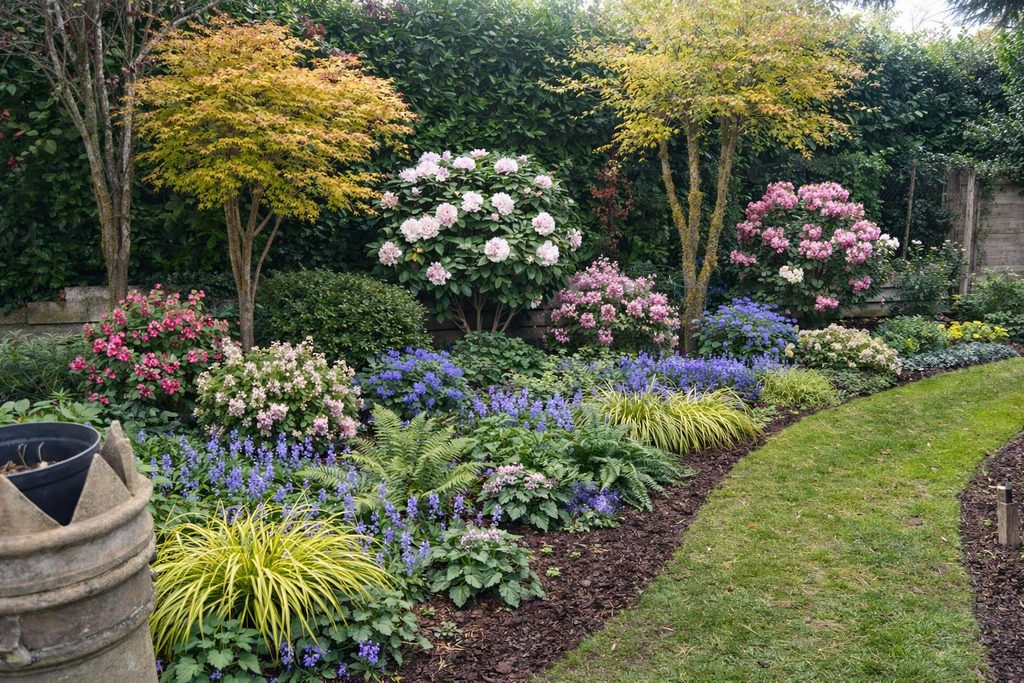
Design Created by the GardenAdvice Border Designer
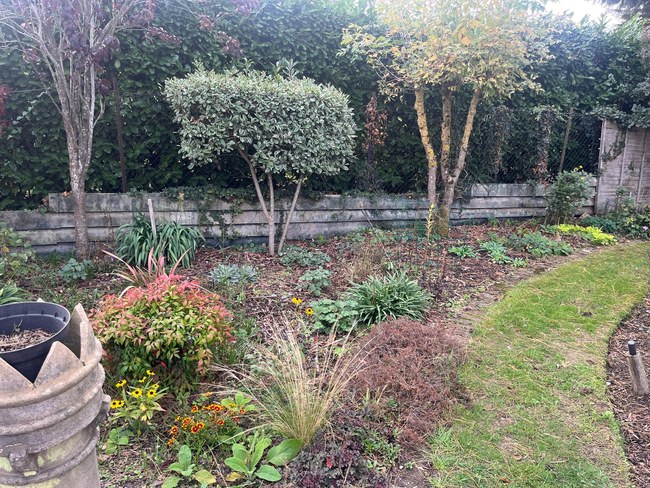
Starting border picture
Discover a New Way to Plan, Design and Care for Your Garden with GardenAdvice MyGardenTeam
Have you ever wondered what your garden could look like with a different planting scheme? Or wished you could identify an unknown plant, investigate a pest or disease, or get gardening advice whenever you need it?
With GardenAdvice MyGardenTeam, you can explore a new approach to gardening using two innovative AI tools: Elena AI Gardening Assistant and the AI Garden Border Designer.
And the best part? You can try them for yourself using our online demonstration website.
Visit the MyGardenTeam Demo:
https://gardenadvice.co.uk/mygardenteam-demo
The demonstration gives you an opportunity to experience how GardenAdvice combines artificial intelligence with practical horticultural knowledge and personalised gardening support.
1. Meet Elena – Your AI Gardening Assistant
Elena is designed to help gardeners identify plants, solve gardening problems, discover new planting ideas and care for their gardens throughout the year.
Whether you’re an experienced gardener or just getting started, Elena provides practical advice in response to your questions.
What can Elena help you with?
Plant Identification
Found an interesting plant but don’t know its name?
Upload a photograph and ask Elena to identify it. Elena can suggest the plant’s name, explain its growing requirements and provide advice on pruning, feeding and general care.
Pest Identification
Noticed holes in your leaves, unusual insects or damage to your plants?
Upload a photograph and Elena can help identify likely pests, explain the damage they cause and recommend suitable methods of control.
Plant Disease Identification
If your plants are showing signs of mildew, leaf spots, dieback or unusual discolouration, Elena can examine your photographs and suggest possible causes and treatments.
Plant Health and Nutrient Problems
Elena can also help investigate yellowing leaves, poor growth, drought stress, watering problems and possible nutrient deficiencies.
Seasonal Gardening Advice
Ask Elena what you should be doing in your garden this month, including pruning, feeding, planting, soil improvement and seasonal maintenance.
New Planting Ideas
Discover plants suitable for sunny or shady borders, different soil types, wildlife-friendly gardens and year-round colour.
How to try Elena
- Visit https://gardenadvice.co.uk/mygardenteam-demo/
- Open the Elena AI Gardening Assistant section.
- Enter the demonstration password displayed on the website, if requested.
- Type or dictate your gardening question.
- Upload a photograph if you would like help identifying a plant, pest or disease.
- Read Elena’s advice and ask follow-up questions.
Try asking Elena:
- “Can you identify this plant from my photograph?”
- “What is eating the leaves of my roses?”
- “Why are my hydrangea leaves turning yellow?”
- “Which plants would provide colour in a shady border?”
- “What gardening jobs should I be doing in October?”
- “Can you suggest a low-maintenance planting scheme for my garden?”
Elena’s photo-based identifications are suggestions rather than guaranteed diagnoses. For difficult problems, a GardenAdvice adviser can provide further support.
2. Try Our AI Garden Border Designer
One of the most exciting features of MyGardenTeam is the AI Garden Border Designer.
This allows you to explore planting ideas visually, using a photograph of an existing garden border or an area you would like to improve.
Instead of simply imagining how different plants might look together, you can ask the designer to create a visual representation of your ideas.
How to create a garden design
- Visit the MyGardenTeam demonstration website. https://gardenadvice.co.uk/mygardenteam-demo/
- Open the Garden Border Designer.
- Enter the demonstration password if requested.
- Upload a photograph of a garden border or planting area.
- Describe the style or changes you would like to explore.
- Generate a suggested design and review the planting ideas.
For example, you might ask:
“Redesign this border with flowering shrubs, roses and hardy perennials to provide colour from spring until autumn.”
The designer can create a visual concept to help you explore how your garden might look.
3. Create Several Different Versions of the Same Garden
You don’t have to settle for the first design.
One of the most useful features of the AI Garden Border Designer is the ability to experiment with different planting schemes for the same garden area.
You could ask for:
- Version 1 – Cottage Garden: Roses, delphiniums, hardy geraniums and traditional flowering perennials.
- Version 2 – Contemporary Garden: Ornamental grasses, structured planting and a simple colour palette.
- Version 3 – Wildlife-Friendly Garden: Nectar-rich flowers, pollinator-friendly perennials and plants providing seasonal interest.
- Version 4 – Low-Maintenance Garden: Evergreen shrubs, ground-cover plants and reliable, long-flowering perennials.
You can continue adjusting the design by changing individual plants, adding more colour, reducing maintenance or experimenting with different arrangements.
This allows you to compare ideas before purchasing plants or carrying out any garden work.
4. See Your Garden Through the Four Seasons
A successful garden design should look attractive throughout the year, not just during the summer.
With the Garden Border Designer, you can ask for different seasonal views of the same planting scheme.
Spring – Fresh Growth and Early Colour
Explore how your garden could look with daffodils, tulips, early-flowering shrubs and emerging perennial foliage.
Summer – Flowers and Colour
See your proposed border with roses, salvias, hardy geraniums and summer-flowering perennials at their best.
Autumn – Warm Colours and Texture
Discover the effect of ornamental grasses, late-flowering perennials, seed heads and colourful autumn foliage.
Winter – Structure and Evergreen Interest
Explore the importance of evergreen shrubs, winter-flowering plants, attractive stems and structural planting.
Try this request in the Garden Border Designer:
“Please create four seasonal versions of this garden border showing spring, summer, autumn and winter. Keep the same plants and layout so I can see how the garden changes throughout the year.”
These images are design illustrations rather than exact predictions of plant growth or flowering times, but they are a useful way to develop ideas for year-round interest.
5. Use Elena and the Garden Border Designer Together
The real benefit comes from combining both AI tools.
For example, you could begin by asking Elena to recommend suitable plants for a sunny border with dry soil.
Elena can explain which plants are likely to thrive, how large they will grow and when they flower.
You can then take those ideas to the Garden Border Designer and create a visual planting concept.
If you would like to change the design, simply ask for another version.
You might decide to replace some shrubs with roses, add more evergreen structure or include plants that flower later in the year.
You can then return to Elena for further information about the plants in your chosen design.
This combination of practical advice and visual garden planning helps you make more informed planting decisions.
6. More Than Just AI – Your Own Garden Records and Plant Lists
The full GardenAdvice MyGardenTeam membership goes beyond answering questions and creating garden designs.
Members have access to their own personalised online gardening area, where they can develop a record of their garden over time.
Features include:
- Your Garden Plants: Build a record of plants growing in your garden.
- Your Plant Wish List: Save plants you are considering purchasing or planting.
- Elena’s Notes: Keep useful gardening questions, answers and recommendations.
- Garden Border Plans: Develop and organise planting ideas for different areas of your garden.
- Personal GardenAdvice Support: Combine AI assistance with advice from experienced GardenAdvice gardening advisers.
The demonstration website lets visitors explore the experience, while full membership provides a personalised service focused on their own garden.
7. Try the MyGardenTeam Demo Today
You don’t need to imagine how these tools work. Visit our demonstration website and experiment with them yourself.
Try the GardenAdvice MyGardenTeam Demo:
https://gardenadvice.co.uk/mygardenteam-demo
Start by asking Elena a gardening question or uploading a photograph of a plant.
Then try the Garden Border Designer with a photograph of your own garden, exploring different planting styles and seasonal views.
Experiment with several versions and discover new possibilities for your outdoor space.
8. Discover the Full MyGardenTeam Membership
GardenAdvice MyGardenTeam combines modern AI technology with the practical experience of professional gardening advisers.
Rather than relying on general gardening information alone, members can develop a personalised garden knowledge base supported by their own garden notes, plant records, planting plans and ongoing advice.
Whether you’re planning a new border, restoring an established garden, solving a plant problem or simply looking for fresh inspiration, MyGardenTeam is designed to help you get more from your garden.
Explore MyGardenTeam membership:
https://gardenadvice.co.uk/my-garden-team
Try the demonstration:
https://gardenadvice.co.uk/mygardenteam-demo
GardenAdvice MyGardenTeam – Your garden, your ideas, your personal AI gardening assistant, supported by real gardening expertise.


