
Autumn Shade Border Design
Download full shade border design details as a pdf
Create Your Own Garden Border Design with GardenAdvice AI
Discover how easy it can be to plan a beautiful new garden border using the GardenAdvice AI Garden Border Designer. Try our online demonstration and explore new planting ideas for your own garden.
Have you ever looked at a garden border and wondered how it could be transformed with different plants, colours and planting combinations?
Perhaps you have a shady border that needs brightening up, a sunny area that could benefit from more flowers, or an established garden where you would like to introduce some new plants without disturbing everything already growing.
With the GardenAdvice AI Garden Border Designer, you can explore these possibilities by uploading a photograph of your garden and describing what you would like to achieve.
You can even create several versions of the same border to compare different planting ideas and seasonal effects.
Try the GardenAdvice AI Garden Border Designer
How does the Garden Border Designer work?
The GardenAdvice AI Garden Border Designer combines artificial intelligence with horticultural knowledge to help you explore new planting schemes.
Getting started is straightforward.
Step 1 – Upload a photograph of your garden
Take a photograph of the garden border or area you would like to redesign.
It could be an existing flower border, an area beneath trees, a narrow strip alongside a fence or even a completely new planting area.
The designer uses your photograph as the starting point for creating a proposed garden design.
Step 2 – Describe your ideas
Tell the Garden Border Designer what you would like to achieve.
For example, you could ask for:
- A low-maintenance border with year-round interest.
- A colourful cottage garden with flowering perennials.
- A shady woodland border featuring ferns and flowering shrubs.
- A drought-tolerant border for a sunny position.
- A wildlife-friendly border to attract bees and butterflies.
- An autumn border with colourful foliage and winter structure.
You can also explain which existing plants, trees, paths and other garden features you would like to retain.
The more information you provide about your garden, the more useful the proposed design can be.
Step 3 – Create your garden border design
The Garden Border Designer produces an illustrative image showing how your proposed planting scheme could look.
It can also provide a suggested plant list, including information about the plants, their approximate mature sizes, spacing, seasonal interest and suitable planting positions.
This helps you understand not only how the finished border might look, but also which plants could be used to create the design.
Step 4 – Experiment with different designs
One of the most useful features of the GardenAdvice AI Garden Border Designer is the ability to experiment.
You don’t have to accept the first design.
You could ask the designer to:
- Add more autumn colour.
- Replace shrubs with flowering perennials.
- Introduce more evergreen plants.
- Create a lower-maintenance version.
- Use different flower colours.
- Show how the border might look in spring, summer or autumn.
By creating several versions, you can compare different planting combinations before deciding which ideas you prefer.
Example – Creating an autumn shade border
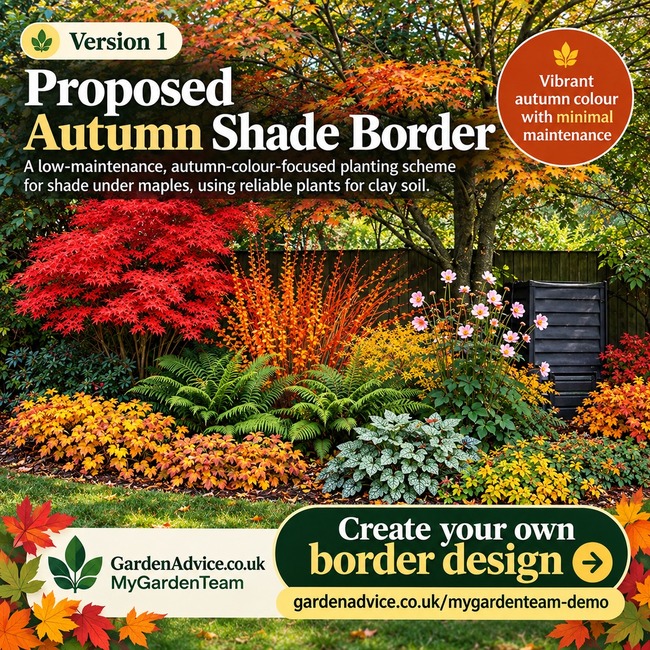
Our example design shows how a shaded garden border beneath established trees could be developed to provide spectacular autumn colour.
The proposed planting scheme combines Japanese maples with colourful dogwood stems, evergreen ferns, autumn-flowering anemones and attractive groundcover plants.
Suggested plants include:
| Plant | Main attraction |
|---|---|
| Acer palmatum ‘Osakazuki’ | Brilliant scarlet autumn foliage |
| Cornus sanguinea ‘Midwinter Fire’ | Colourful orange and red winter stems |
| Dryopteris wallichiana | Architectural fern foliage |
| Epimedium × perralchicum ‘Frohnleiten’ | Groundcover and seasonal foliage |
| Sarcococca confusa | Evergreen foliage and fragrant winter flowers |
| Anemone tomentosa ‘Robustissima’ | Pink flowers in late summer and autumn |
| Brunnera macrophylla ‘Jack Frost’ | Attractive silver-patterned leaves |
The aim is to create a border with strong autumn colour, contrasting foliage and attractive structure throughout the year.
The designer can also suggest approximate planting positions, helping you visualise how the plants might be arranged.
Remember: AI-generated designs are illustrative proposals. Final plant selection, quantities and spacing should be checked against your garden’s actual growing conditions and measurements.
Explore your garden through the seasons
A garden changes considerably throughout the year, and a planting scheme that looks spectacular in June may be quite different in October.
The GardenAdvice Garden Border Designer allows you to explore seasonal variations.
You might create a spring version featuring bulbs and flowering shrubs, a summer version with colourful perennials, and an autumn version focusing on foliage and late flowers.
This is particularly useful when planning a border that provides interest throughout the year rather than relying on just one flowering season.
Combine AI design with GardenAdvice horticultural expertise
Creating an attractive planting scheme is only part of successful garden design.
Plants also need to be suitable for the conditions in which they will grow.
Important considerations include soil type, drainage, sunlight, shade, available space and the eventual size of the plants.
GardenAdvice combines AI garden design with practical horticultural advice through its MyGardenTeam service.
Our gardening advisers can help review planting ideas, refine plant choices and develop a practical plan for creating and maintaining your border.
Try the GardenAdvice Garden Border Designer online
You can explore the Garden Border Designer through our online MyGardenTeam demonstration.
It’s an opportunity to discover how AI can help you visualise new planting ideas, experiment with different styles and begin planning changes to your garden.
You don’t need to redesign your entire garden. Start with just one border and see what is possible.
Create your own garden border design today
Try the GardenAdvice AI Garden Border Designer – Online Demo
GardenAdvice – Combining horticultural experience with AI to help you create a better garden.


